
How to Spot Fake Facebook Notifications (And Avoid Scams)

Posted on April 23, 2026
We’ve all been there: you’re scrolling through Facebook, and out of the corner of your eye, you see that little red bubble. "Someone just messaged you," it says. Your curiosity peaks, and you're ready to click.
But wait—before you tap that notification, you need to look closer. Social media platforms are becoming a minefield of "Sponsored" content designed to look exactly like your system alerts.
The Anatomy of the Scam
At first glance, this looks innocent: a red “3” badge on the Messenger icon and the text “(1) Someone just messaged you” with a link to fb.com. Many users instinctively click it.
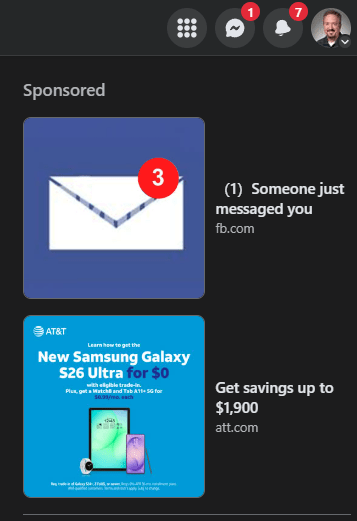
But look closer. Notice where that notification is sitting? It is located directly under the "Sponsored" heading, as pointed out below:
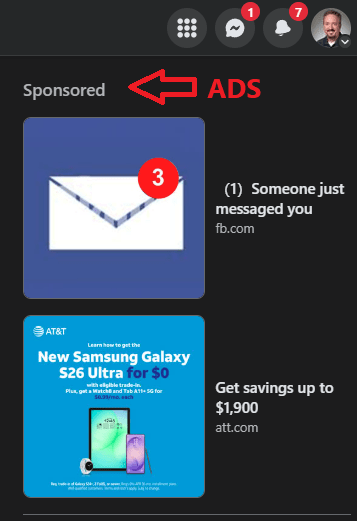
The Red Flag: Everything under the “Sponsored” label is an advertisement, not a real notification. The fake message alert is actually an ad trying to lure you to a phishing site or malicious page. Scammers use these sponsored notifications to impersonate legitimate Facebook alerts, hoping you’ll enter your login details or download something harmful. So where are your real notifications?
Where to Find the "Real" Stuff
To stay safe, you need to know where Facebook’s actual interface ends and the ads begin. The real notifications are always tucked away in the navigation bar at the top of your screen.
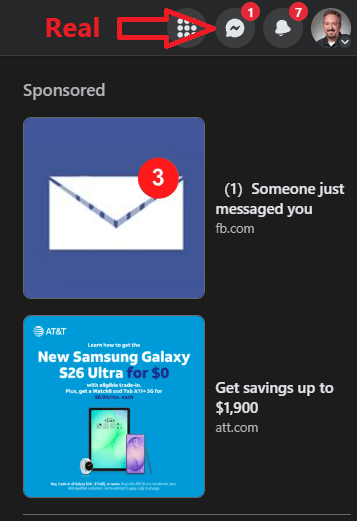
Your "Safe Zones" are always at the very top:
- The Messenger Icon: Where your actual direct messages live.
- The Bell Icon: For real likes, comments, and tags.
- Your Profile Picture: For your account settings and security.
Summary: Stay Skeptical
If a notification appears within the scrolling feed or specifically under a "Sponsored" tag, ignore it. If you are unsure, never click the ad link. Instead, go directly to the official notification bell at the top of the page to see what's actually happening.
Scammers are getting more sophisticated, but once you know where to look, these fake notifications become easy to spot. Stay savvy, stay skeptical, and keep your account safe!
Contact Us
Get Expert Help With Your Technology
Have a question or need assistance? Fill out the form below, and our team will get back to you quickly. We're here to make your tech work for you!